Practical AI Features for Small-Business Websites in 2026
By Jose Ibarra ·
Short answer: The AI features that pay off on a small-business website are narrow ones that do a single job. A service matchmaker recommends the right service. A quote estimator gives a ballpark price. Smart intake sorts new inquiries, and admin tools help your team draft content. Start with one feature tied to a question customers already ask you. Keep a human in the loop and set a spending cap. Most small businesses aren't doing this yet, so a well-built feature still sets you apart.
Where small businesses stand
Despite the hype, AI use among U.S. businesses is still in the minority. As of May 2026, 19.8% of businesses told the U.S. Census Bureau they had used AI in the previous two weeks. Fewer than 20% of firms with four or fewer employees reported using it (U.S. Census Bureau). Private surveys report much higher numbers, but they define "use" more loosely.
For a small business, that's an opening. A website that answers questions well and quickly still stands out.
1. A service matchmaker
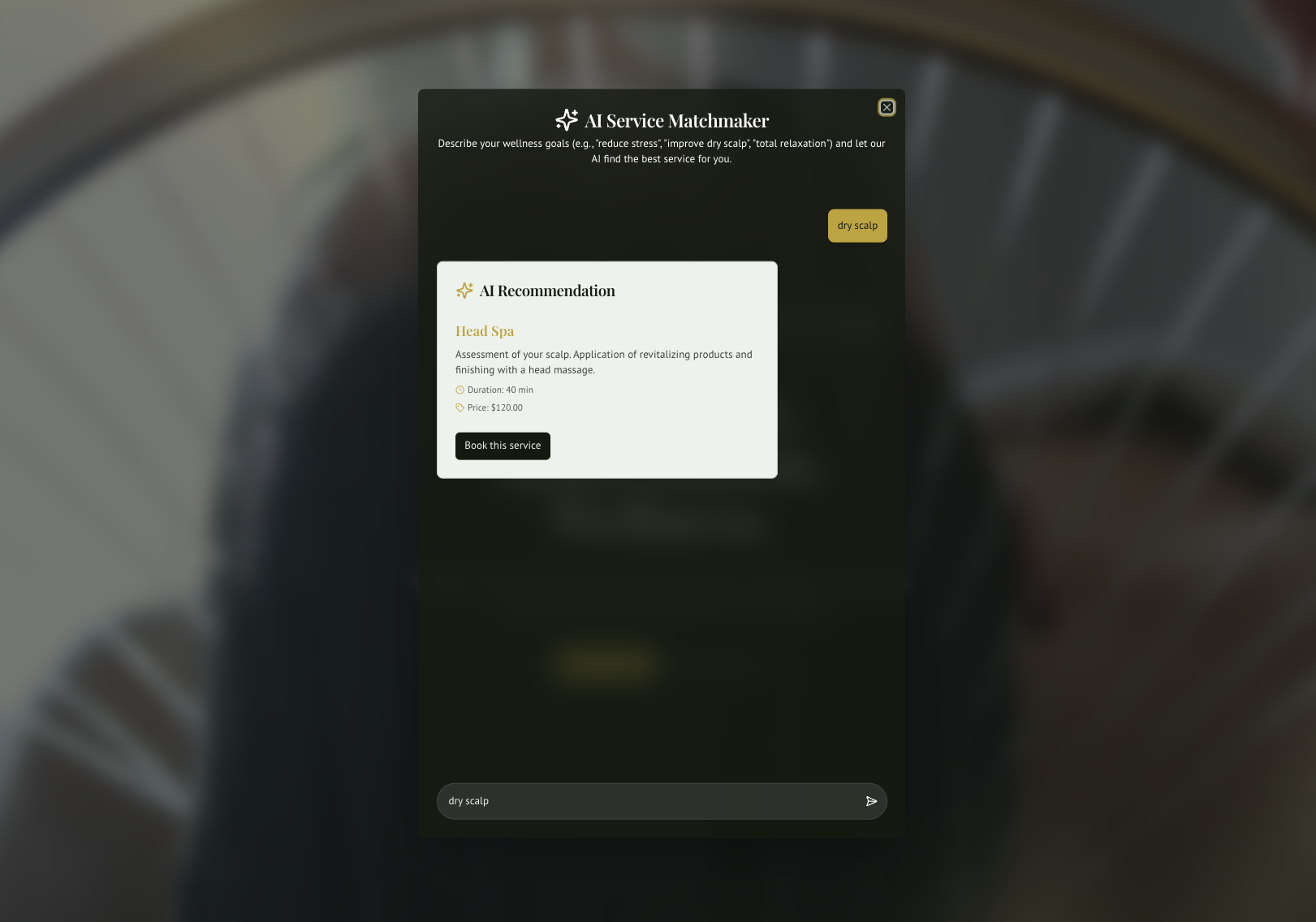
What it does: The visitor describes what they want in their own words, and the site recommends the best-fitting service.
Example: For Anni Head Spa, I built an AI Service Matchmaker. Visitors describe their wellness goals and get the most suitable treatment recommended. From there they can filter by category and location and go straight to booking.
Why it works: Service menus are confusing. A matchmaker turns "I'm not sure what to book" into a booking.
2. A quote or budget estimator
What it does: It turns a few form answers into suggested services and a preliminary price range.
Example: The Ibarra Land Surveyors quote form uses an AI flow built with Google's Genkit. It analyzes the visitor's inputs, suggests the right surveying services and gives a preliminary budget estimate.
Why it works: People want a ballpark before they call. Giving one, clearly marked as an estimate, brings in more qualified leads and fewer surprises.
3. Smart intake and triage
What it does: It reads incoming contact or intake forms, summarizes them, tags urgency and practice area, and routes each one to the right person.
Why it works: Response speed wins clients, especially in professional services. AI doesn't replace your judgment here. It just makes sure nothing sits unread.
4. Drafting help in your admin panel
What it does: It helps your team write news posts, service descriptions or newsletters inside your own content manager, which a person reviews before publishing.
Example: Lawlly, a law-office management app I'm developing, uses generative AI to help with document drafting and case summaries. A professional always reviews the output.
Why it works: The site stays fresh without hiring a writer, and you stay in control of what's published.
5. Multilingual help
What it does: It drafts translations of your content for a fluent person to review, or helps answer visitors in their own language.
Why it works: In South Florida, Spanish isn't optional. AI makes a bilingual site much cheaper to maintain, as long as a fluent speaker reviews anything customer-facing.
Guardrails that matter
- Keep a human in the loop. AI suggests; people decide. Mark estimates as estimates.
- Protect sensitive data. Don't send medical, legal or financial details to an AI service without a clear agreement on how that data is handled. For law firms and healthcare, this is non-negotiable.
- Set spending caps. AI services charge per use. Rate limits and spam protection, such as reCAPTCHA on every form, keep a bot from running up your bill.
- Have a fallback. If the AI service is down, the form should still submit and a person should still respond.
- Be transparent. Tell visitors when they're getting an AI-generated recommendation.
How to pick your first feature
Ask yourself what question customers ask most before they buy. If it's "which service do I need?", build a matchmaker. If it's "how much will this cost?", build an estimator. If your team is slow to respond to inquiries, start with intake triage. One focused feature that works beats five that confuse people.
FAQ
What's the most useful AI feature for a small-business website? The one that answers your customers' most common pre-purchase question, usually which service to choose or what it will cost.
Do I need a chatbot? Not necessarily. A focused tool, like a matchmaker or estimator built into a form, is often more useful and easier to control than an open-ended chatbot.
How much do AI features cost to run? Usage costs depend on traffic and the model used. For most small-business sites they're modest, and rate limits and spam protection keep them predictable.
Is AI on my website safe for client data? It can be, with the right setup: send only the data needed, use providers with clear data-handling terms, and keep sensitive matters out of AI tools entirely when in doubt.
How many small businesses use AI? The U.S. Census Bureau measured 19.8% of businesses using AI as of May 2026, and under 20% of the smallest firms.
Curious what AI could do on your site? I build custom sites and web apps with practical AI features for South Florida businesses. Tell me what your customers ask most.
Sources
- Large Firms With at Least 20 Employees Biggest AI Users, U.S. Census Bureau, May 2026